Why “Show Dependencies” doesn’t show you everything
Dependency tracking is accurate about declared metadata references. It does not read plugin IL, flow JSON, form scripts or PowerFx, so a writer in any of those is invisible to it.

Anyone who has worked in Dynamics 365 for a while has used Show Dependencies. You select a column, run the check, read the list, and make your decision from it. Sometimes something breaks anyway.
The feature is doing its job correctly. It was built to answer a narrower question than the one most people bring to it, and that difference tends to surface after the change has already shipped.
It answers a different question
Dependency tracking protects solution integrity. Before you delete a component, the platform checks whether removing it would leave some other component pointing at something that no longer exists, which would break an export or an import. It does that job well.
The question people actually bring to the dependency view is usually a different one.
Show Dependencies answers “will deleting this break the solution?” It does not answer “will changing this break the business?”
From a distance those look like the same question. The difference between them comes down to whether a reference is declared in metadata or buried in logic.
What the platform actually tracks
Dataverse maintains dependency records between solution components. Those records get written when one component references another in metadata: a structural, declarative reference the platform can see without interpreting anything. A form definition naming a column is a declared reference. A view's FetchXML naming a column is a declared reference.
So the tracked set is roughly the surfaces where the reference is the metadata:
- Forms that place the column on a tab
- Views and charts whose FetchXML selects or filters on it
- Business rules that read or set it
- Classic workflows, to the extent their definition names it declaratively
- Relationships, keys, and other schema-level bindings
- Solution membership, so you can see which solutions carry the component
For those surfaces the list is reliable. If a form uses the column, dependency tracking knows about it.
What it cannot see, and why
Everything else stores its reference inside something the platform keeps but never reads: compiled code, a script file, a JSON document, a formula language. Dataverse stores all of it reliably and interprets none of it.
| Surface | What the platform knows, and what it doesn't |
|---|---|
| Plugin assemblies | It knows the assembly is registered and the step is bound to a message, stage, and table. It does not decompile the assembly. A line like entity["creditlimit"] = 0m; sitting inside compiled IL is invisible to dependency tracking. |
| Form JavaScript | It knows a web resource is registered as an event handler on the form. It does not parse the JavaScript. A formContext.getAttribute("creditlimit").setValue(0) inside that file is invisible. |
| Power Automate flows | It knows the flow exists in the solution and, through its connection reference, that it talks to Dataverse. It does not walk the flow's definition JSON to work out which columns each action writes. |
| Canvas apps | It knows the app is a component. The PowerFx inside it, a Patch() against your table naming your column, sits in the packaged app, not in metadata. |
| HTML web resources | Script embedded in an HTML web resource has the same problem as form JavaScript, one layer deeper. |
| Anything late-bound | Where the column name is assembled at runtime from configuration or a string, there is no static reference to find. Nothing can resolve this from structure alone, including Pathix. |
| External integrations | Anything writing over the Web API from outside the platform leaves no trace in the environment's metadata at all. |
These are not separate oversights waiting on separate fixes. They are one boundary drawn in the same place each time. The platform tracks references it can read structurally, and interpreting compiled IL, JavaScript, JSON and PowerFx was never part of what dependency tracking set out to do.
The dependency view has two sides: what this component requires, and what depends on this component. The blind spot above applies to both, but it bites hardest on the second one, because that is the side you consult before changing something.
A worked example
This is account.creditlimit in the sample environment on our demo, with everything that touches the column in one list. Eighteen components: six that can write the column, twelve that read it.
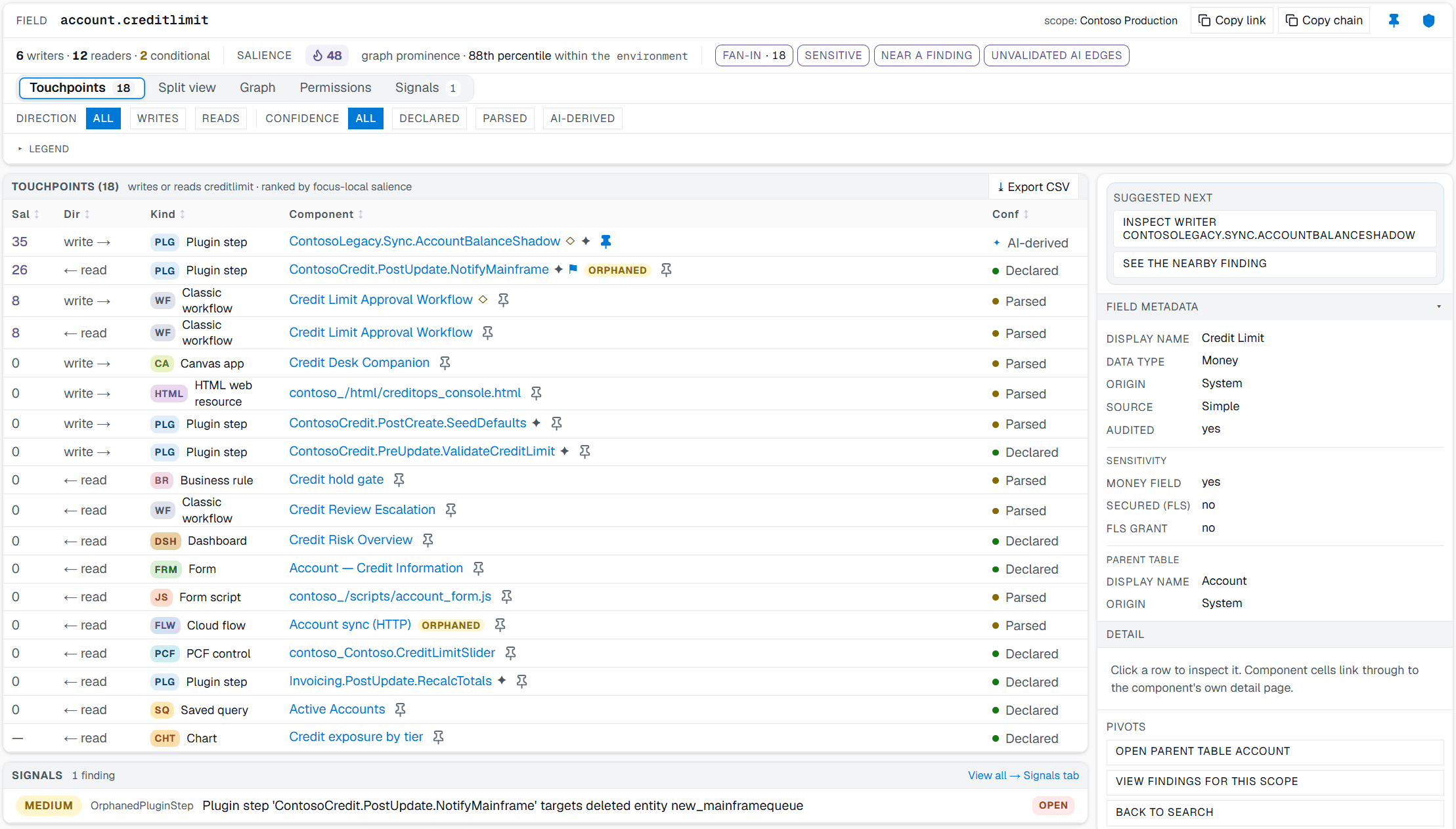
A sample environment, not a customer's. The components are authored for the sample environment; the product behavior around them is real.
Sort those eighteen by where the reference actually lives and the split is not subtle. Most of the readers are display surfaces holding their reference in metadata: a form, a dashboard, a saved query, a chart, a business rule. Those are exactly what dependency tracking is built to find, and it finds them.
Then look at the six writers. One is a classic workflow. The other five are three plugin steps, a canvas app, and an HTML web resource, which puts the reference to creditlimit inside compiled IL, a packaged app, and a script file. None of those three formats is something the platform reads.
The coverage runs opposite to what you need. Surfaces that display a column are tracked well; surfaces that change its value mostly are not. So the check comes back short and clean, the change ships with confidence behind it, and the plugin nobody remembered turns up afterward.
Check it yourself in 90 seconds
You should not take a vendor's word for any of this, and you do not have to. The whole check runs in your own environment in about ninety seconds.
- Pick a column you know a plugin or a flow writes to. Everyone has one.
- Open the column in the maker portal or the classic solution explorer.
- Run Show Dependencies and read the list.
- Check whether the plugin or the flow appears in it.
Whatever comes back is the answer for your environment and your platform version, which is worth more than anything this page can tell you. If the writer you had in mind does show up in the list, we would like to hear about it: brian@pathix.app.
Doing the rest by hand
If you need the full picture before a schema change, the manual sweep is the fallback, and it does work. Know what it costs before you commit to a date.
The parts you can do
- Export the unmanaged solution and unpack it.
customizations.xmlcarries the form definitions, view FetchXML, and ribbon definitions, and is greppable for the column name. - Enumerate plugin steps in the Plugin Registration Tool, note every step bound to the table, then read the source for each one if you have it.
- Export each classic workflow and read the XAML. The column reference is in there, wrapped in enough ceremony that grep works better than reading.
- Pull each cloud flow's definition JSON and walk the Dataverse actions, checking the item payloads for the column's logical name.
- Download every JavaScript web resource registered on the table's forms and search them for the logical name.
The two parts you cannot
- Compiled plugin assemblies where nobody has the source. If it came from an ISV or a contractor who left, the IL is sitting right there but not in a form you can read or grep.
- Late-bound and dynamic writes, where the column name is assembled at runtime. Nothing resolves those from structure, and a tool that claims otherwise is guessing.
On a mature environment with a few hundred components that sweep runs to most of a day per column, it has to be redone whenever the environment changes, and the two gaps above mean it never quite completes. None of which means you are doing it wrong; it is just what the work costs.
What to do with this
The takeaway is smaller than “stop using Show Dependencies.” Keep using it for what it is good at, which is checking whether a delete is safe from the solution's point of view.
When the question is impact rather than integrity, treat the result as a starting point. Assume the write-side surfaces are missing until you have checked them, and put the sweep in the estimate rather than discovering it mid-deployment.
How Pathix answers the same question →