Change a table without
breaking production.
The impact analysis that used to take a week of reading decompiled code is now a scan and a few questions. You still make the calls, but you make them knowing what is connected to what, instead of finding out in production.
Prefer the capability list? Every change-impact feature, itemized →
Everything bound to a table, in one call.
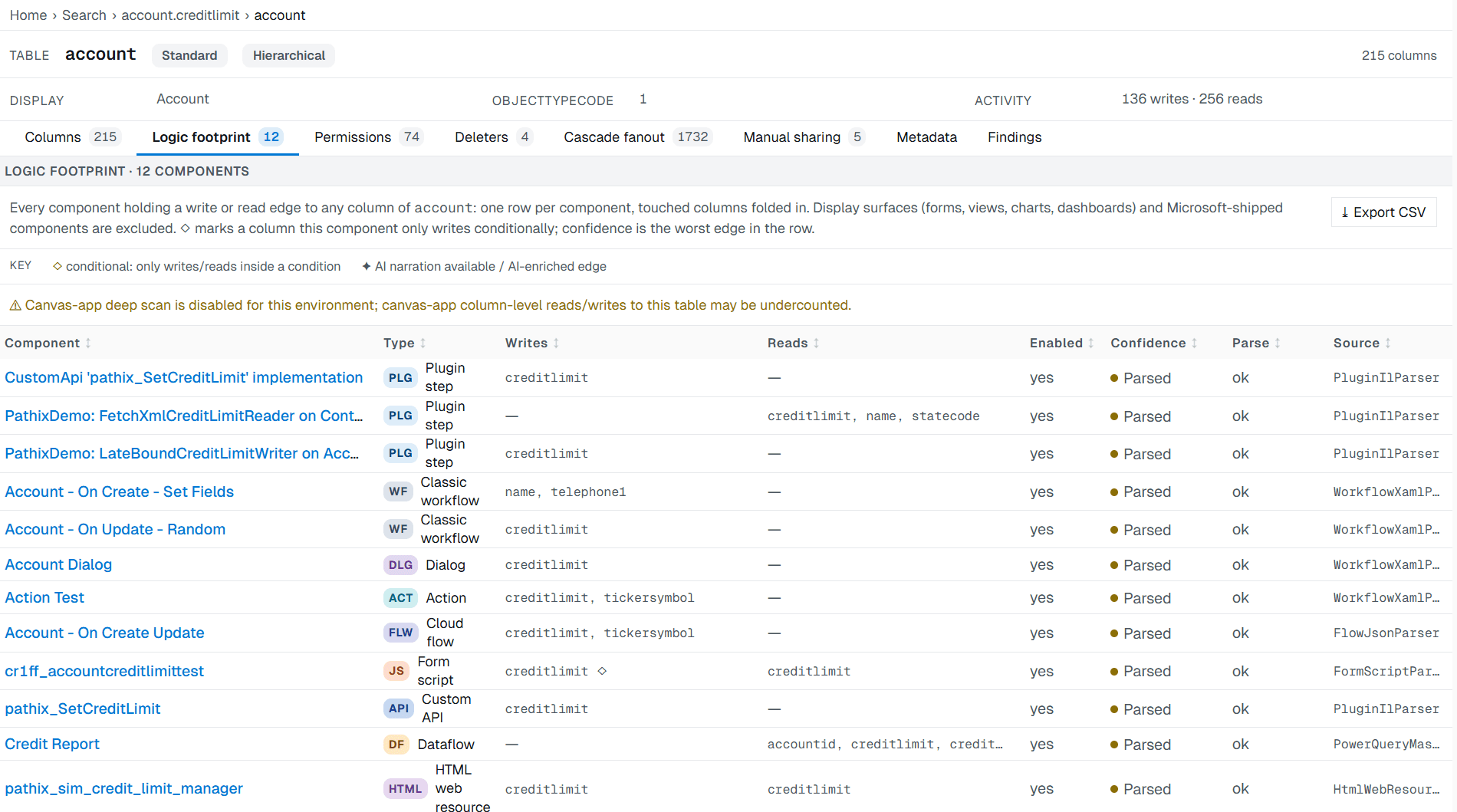
Point Pathix at a table and it returns every component that touches any column on it, with the columns each one writes or reads folded in. You see which components exist only because of how the table is shaped today, and which carry rules you have to preserve. That is the migration, visible up front instead of three weeks in.
A leaf-first rewrite order that flags its own unproven edges.
Point Pathix at a table and it returns a leaf-first rewrite order, with column data flow and orchestration coupling in one sequence. Cycles with no provable internal order, edges it could not resolve, and components it could not place are marked, not dropped. Verify the order before you build to it.
A write has nowhere to hide.
40 surfaces today · 2 more on the wayEverything above is only as good as what Pathix can read. These are the surfaces it parses; the security model is scanned separately.
- Plugin steps
- Plugin assemblies (IL)
- Custom APIs
- Classic workflows
- Dialogs
- Actions
- Business rules
- Business process flows
- Cloud flows (Power Automate)
- Dataflows (Gen2)
- Dataverse functions (low-code plug-ins)
- Form scripts (JavaScript)
- HTML web resources
- Ribbon and command bar
- PCF controls
- Canvas apps
- Forms
- Formula, calculated and rollup columns
- Attribute mappings
- Saved queries
- Charts
- Dashboards
- Connection references
- Custom connectors
- Service endpoints and webhooks
- Solutions
- Choices
- Web pages
- Web templates
- Content snippets
- Basic forms
- Lists
- Advanced forms
- Server logic
- Web files
- Copilot Studio agents
- Agent flows
- AI Builder models and prompts
- AI prompt columns
- Knowledge sources
See the blast radius before you touch a cascade.
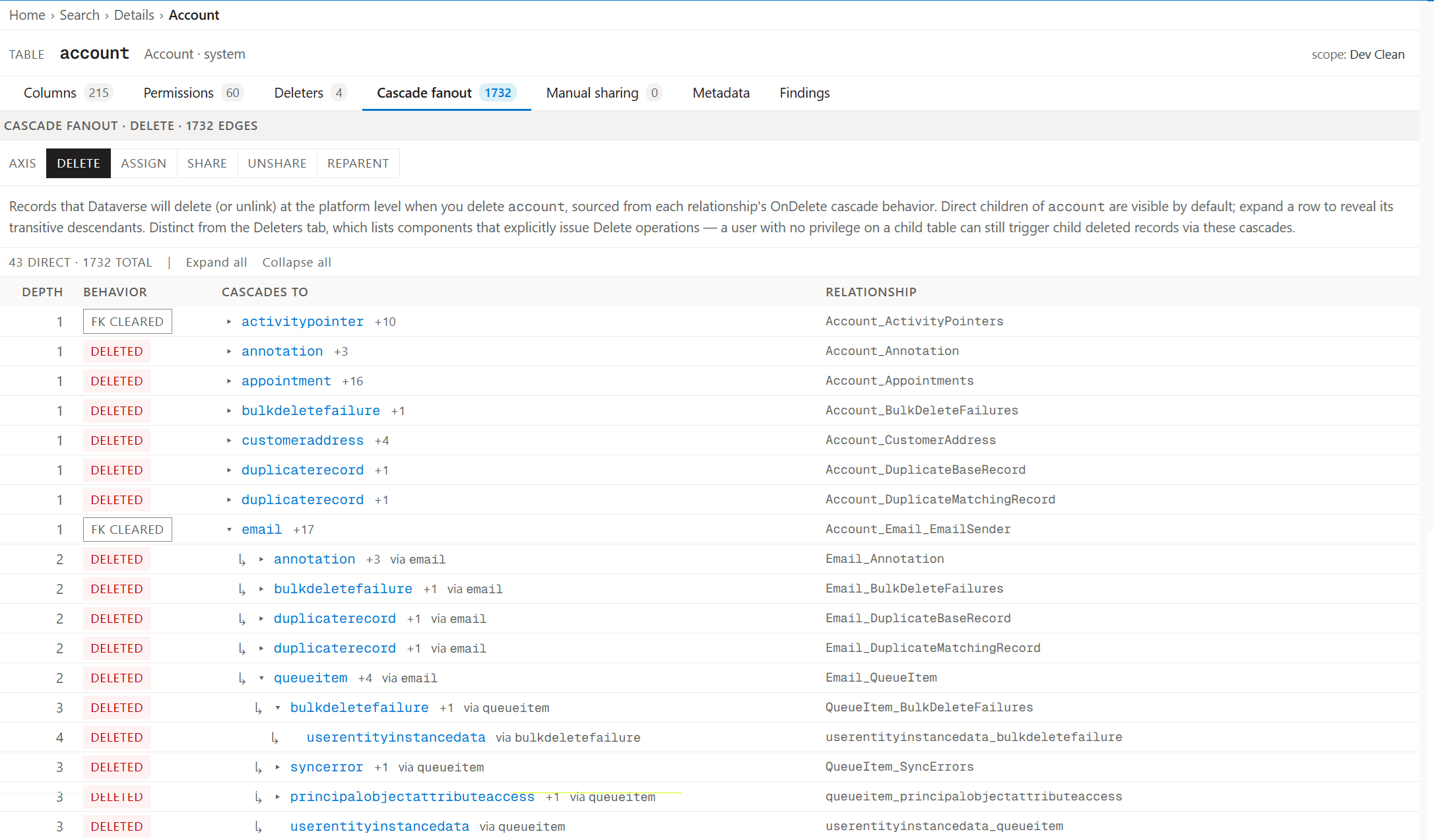
Change a relationship behavior and the reach can be enormous and invisible. Pathix lays out the full cascade fanout for a table before you touch it: how far it reaches, how deep, whether a delete cascades or clears the reference, and which tables feel it.
We gave an AI agent the graph, not a migration plan. It rebuilt the plan anyway.
On a synthetic demo environment, we gave an agent a real normalization job with no plan and junior-developer prompting. Working off the Pathix graph, it rebuilt the whole target model: one overloaded table resolved into four, every plugin's disposition mapped, a sequenced migration drafted. A second agent from a different maker, same graph, drew the same answer. The plan comes from the structure underneath, not the model.
And it caught what a schema diagram never would. Five of the six plugins on that table silently swallow their own errors, which means the rollups and totals sitting in production may already be wrong. The plan's instruction is blunt: recompute those values on migrate, do not trust-migrate them.
Read the migration plan it produced →
With AI on: an agent drafts the migration plan straight from the graph, with the disposition of every component and the data-integrity catches a static diagram can't show.
The artifact you hand your boss, your board, or your auditor.
One click produces a printable Environment Report: a state-of-the-environment writeup with remediation and control mappings, and an explicit note on what was and was not scanned. It is what you put in front of someone who will never open the tool.
Bring the table that scares you.
A 30-minute walkthrough on a pre-scanned demo environment. We'll trace whatever you're afraid to change.